 That Blog
How many tokens do you spend daily? Do you keep count? Do you hit a limit? We’ll discuss a few details about this in this post.
With coding agents on the rise, I’ve reduced my use of the editor (IDE, VSCode, etc). A recent example: to edit even a single line of code, I now ask the agent to do it instead of opening the editor myself. There’s no real harm in it — a single-line edit doesn’t use many tokens, especially since the conversation already has full context.
In my opinion, though, this has become a bad habit. One well-placed prompt can save a lot of resources if used effectively — at least for those of us who’ve been developing long enough to know better.
I’ve seen a lot of my colleagues and friends split into two camps: some use AI conservatively, others are tokenmaxxing.
This post is a message to all of us — myself included — to try splitting problems down and letting AI do its magic, instead of throwing everything at it at once.
Plan, Implement, Validate, Iterate
These words are all over the web whenever people look for ways to use their subscriptions or LLM APIs economically, and it holds true in a lot of places — Plan mode in Claude Code, Spec Driven Development in Kiro, and similar approaches elsewhere.
There’s nothing wrong with this, but as always, there’s a catch.
The catch is us. We plan it out initially, but whenever we feel the plan is missing something, we keep adding to it — and scope creeps until the “simple plan” has quietly become a much bigger one.
The same thing happens with vibe-coded apps: we start with a plan to solve one thing, and by the end the app is doing ten more things just to support that one thing.
Matching Model Size to the Job
Part of avoiding this bloat is choosing the right tool for each step, not just the same model for everything. Complexity is a good starting point:
| Complexity | Examples | Model size | Why |
|---|---|---|---|
| Low | Boilerplate, CRUD, formatting, small refactors | Small | Fast, cheap, and a wrong answer is obvious immediately |
| Medium | Feature implementation, bug fixes, standard scripts | Medium | Enough capability to catch the non-obvious cases |
| High | Architecture decisions, complex algorithms, cross-file reasoning | Large | Mistakes compound and are expensive to unwind later |
Two other things worth factoring in beyond complexity alone:
- Iteration cost — how expensive is it to be wrong and retry? Cheap iteration (a local script, quick feedback loop) means you can go smaller and just iterate. Expensive iteration (production deploys, long-running tasks) means it’s worth paying for a bigger model upfront.
- Stakes — planning and reviewing tend to warrant a larger model even for “simple” tasks, since mistakes there propagate downstream into implementation.
That’s the received wisdom, and it’s the framing I started this post believing. Note what it quietly assumes: that model size and cost move together, so “go bigger” always means “pay more”. Later in this post I actually measured that on a real prompt, and that assumption is the part that broke — bigger was not reliably pricier, and the cheapest tier was not the cheapest outcome. Keep the complexity axis in mind as you read the numbers; ignore the money for now.
The Walkthrough
To make this concrete, I’ll walk through a simple example — a CLI tool I’m building side-by-side while writing this post.
Plan
The CLI tool I want to create is a simple pipe reader — reading from stdin and producing output with timestamps added. The scope, for now, is to keep it as simple as just adding a timestamp at first, and later make that configurable via flags.
So looking at the plan, I have clarity on what I want to build first and how I want to keep it extensible in the future.
To start, I’ll also add more detail: what language/framework to use, what the project structure should look like, what libraries or modules to use, etc. All of this detail lets the coding agent + LLM confine the options and remove ambiguity.
The prompt
I want to build a simple CLI tool that reads from stdin (a pipe reader) and
outputs each line with a timestamp prepended.

Scope for v1:
- Read lines from stdin, write to stdout with a timestamp added to each line
- Keep it minimal — no flags or configuration yet

Future extensibility (not for v1, but design with this in mind):
- Configurable timestamp format via flags
- Possibly configurable output format later (e.g. plain, JSON)

Constraints:
- Language: Go 1.26
- Libraries/Modules: Standard Library as much as possible, give me details anywhere the standard library doesn't cover it, and what package you'd recommend instead.
- Project structure should have go.mod and go.sum in root, a cmd/pipe-logger/main.go as code, and if internal packages are needed we use a pkg/ directory for that.
- Keep at least a --help flag available so that users know how to use it.

Give me a plan, not code yet - I want to confirm the direction before implementation.
What it cost
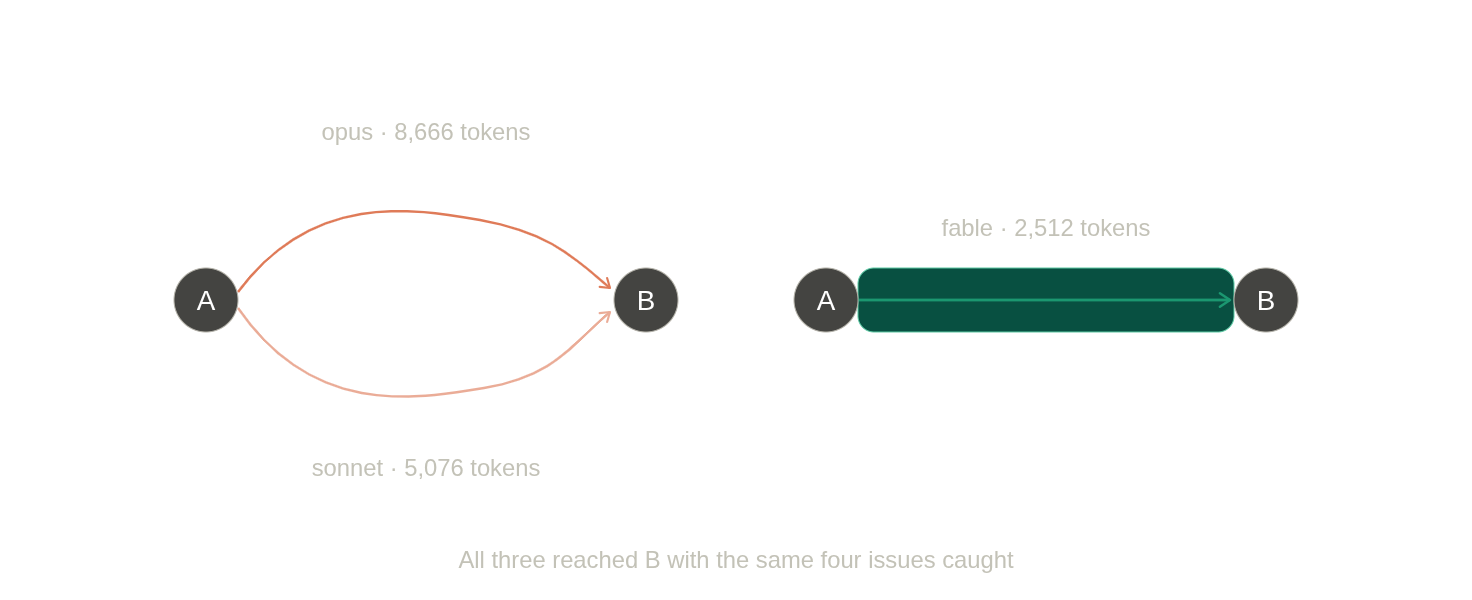
Rather than guess, I ran that exact prompt against four Claude tiers and one local model, measuring tokens, latency and cost. Same prompt, same day, one run each.
| Model | Tier | In | Out | Time (s) | Cost (USD) |
|---|---|---|---|---|---|
| claude-haiku-4-5 | small | 243 | 1006 | 10.55 | $0.0053 |
| claude-sonnet-5 | medium | 341 | 5076 | 55.45 | $0.0514 |
| claude-opus-5 | large | 341 | 8666 | 119.55 | $0.2184 |
| claude-fable-5 | frontier | 341 | 2512 | 36.20 | $0.1290 |
| gemma4:31b | local | 246 | 736 | 5.71 | — |
Total API spend for the run: $0.4041. 1
Cost alone doesn’t tell you much, though. What matters is whether the plan you got back is one you’d actually hand to an implementer. So I checked each plan against four things I knew the spec could get wrong:
| 64KB scanner limit | go.sum contradiction | stderr / exit codes | flag handles --help | |
|---|---|---|---|---|
| Haiku | ✗ | ✓ | ✓ | ✓ |
| Sonnet | ✓ | ✓ | ✓ | ✓ |
| Opus | ✓ | ✓ | ✓ | ✓ |
| Fable | ✓ | ✓ | ✓ | ✓ |
| Gemma | ✗ | ✓ | ✗ | ✗ |
Only one of those is a real runtime bug: bufio.Scanner has a default 64KB line limit, so a long line will stop the scan instead of printing. For a tool whose entire job is reading arbitrary piped input, that matters. Haiku and Gemma both missed it. Everything from Sonnet up caught it and told me to either bump the buffer or switch to bufio.Reader.
The go.sum one is worth calling out for a different reason. My prompt asked for go.sum in the project root — but with a 100% standard-library tool there are no dependencies, so Go never generates one. Every model dutifully included it. Constraints get followed even when they’re wrong.
All five plans, the benchmark script and the raw results are in thatwebsite/bench if you want to read them in full or re-run the comparison yourself.
Sonnet flagged it directly:
Scanner default max token size is 64KB — long lines will error. Worth deciding now: bump buffer size via
Scanner.Buffer(), or usebufio.Reader.
Haiku’s plan and Gemma’s both specify bufio.Scanner with no mention of the limit at all.
What surprised me
I expected a clean ladder: more money, better plan. That isn’t what came back.
Fable and Opus produced identical coverage — all four issues caught. But Fable did it for $0.1290 in 36 seconds, and Opus for $0.2184 in 120 seconds. Opus emitted 8666 output tokens to Fable’s 2512, and output tokens are the expensive half of the bill. So the tier with the highest per-token price was the cheapest per usable plan, by a wide margin, and finished three times faster.
Going the other way, Gemma was the fastest thing on the table at 5.7 seconds and caught the least of anything I tested. Speed and price both point the wrong way if you optimize for either on its own.
Which means the table I opened this post with — small, medium, large, pick by complexity — is directionally right and mechanically wrong. The axis that actually predicted quality here was capability, and the axis that predicted cost was verbosity, and those two are not the same axis. A model that is expensive per token but knows when to stop can be cheaper than a mid-tier model that pads.
Measure the thing you’re actually buying. It isn’t tokens; it’s plans you don’t have to redo.
Implement
Always remember, LLMs are eager to get done with tasks — they will be overly excited 2 to start. That said, with many tools like Pi and Claude Code (in Auto Mode), they will start implementing even if there’s a small hint of approval.
So, read the whole plan, like you’re reading something that a colleague has provided as a specification or a JIRA ticket. Once done, say the word (even LLMs will ask for it).
While changes are being implemented, if there are gaps, modern models will prompt for clarifying questions. If not, there will be assumptions — we can control that via AGENTS.md, but that’s a talk for another time.
Validate
While the code is being implemented we can keep a watch or let it run in the background, and it will do testing and other things without our interference. This is where validation comes into play: if the implementation plan, a system prompt, or any kind of instruction ever added a validation step before completing the turn, it would build, test and even run it once to do integration testing for validation of the work it has done.
If there are any major issues it will go ahead and retry by fixing those issues — import errors, build errors, or even test failures.
Once we are there, this project would have reached version 1.
$ ./pipe-logger --help
pipe-logger prepends an RFC3339 timestamp to each line read from stdin.
Usage:
  tail -f app.log | pipe-logger

$ ls | ./pipe-logger
2026-08-10T20:32:06Z cmd
2026-08-10T20:32:06Z docs
2026-08-10T20:32:06Z go.mod
2026-08-10T20:32:06Z pipe-logger
2026-08-10T20:32:06Z pkg
Iterate
There are cases where we now want to implement more things. My go-to approach has always been creating an implementation plan and then having it implemented after reviewing it. In some cases just asking the tool to “go ahead” would work, as it will anyway scan the directory and check for implementations.
The major difference between iterating and starting from scratch is “context”.
While developing a new thing, the context is empty or limited to what we give as a prompt and other tool-related prompts/configurations. But when we iterate on an existing product we don’t want to start from scratch again — we want to build on top of what we have already built.
Now there are three options: either we keep iterating in the same conversation, create a new empty one, or summarize (compress) and continue.
| Approach | Best when | Trade-off |
|---|---|---|
| Same conversation | Small, closely related follow-up changes; context is still small/relevant | Context keeps growing — token cost per turn rises, and old irrelevant details can dilute focus |
| New conversation | Starting a distinct feature/task that doesn’t need prior history | Loses useful context — you’ll re-explain constraints, or the agent re-discovers them by re-reading files (extra tokens anyway) |
| Summarize/compress and continue | Long-running projects where some history matters but full context is bloated | Summarization itself costs tokens and can lose nuance — the compressed version may drop a constraint you cared about |
A rough rule of thumb: same conversation for anything within the same working session, summarize when a conversation has grown large but the project is ongoing, and a fresh conversation when you’re starting something genuinely unrelated.
$ ./pipe-logger-v2 -h
pipe-logger prepends a timestamp to each line read from stdin.
Usage:
  tail -f app.log | pipe-logger-v2
Flags:
  -format string
        output format: plain or json (default "plain")
  -timestamp-format string
        time.Format layout for the timestamp (default RFC3339)

$ ls | ./pipe-logger-v2 --format json
{"timestamp":"2026-08-10T20:37:46Z","line":"cmd"}
{"timestamp":"2026-08-10T20:37:46Z","line":"docs"}
{"timestamp":"2026-08-10T20:37:46Z","line":"go.mod"}
{"timestamp":"2026-08-10T20:37:46Z","line":"pipe-logger"}
{"timestamp":"2026-08-10T20:37:46Z","line":"pipe-logger-v2"}
{"timestamp":"2026-08-10T20:37:46Z","line":"pkg"}
If I had to define tokenmaxxing now, having written this: it’s not spending a lot of tokens — it’s spending them without asking whether this step needed a bigger model, a fresh context, or a moment of your own review before hitting go. Conservative use isn’t about doing less; it’s about being deliberate at each of these decision points — plan, implement, validate, iterate.
Rates as of August 2026: Haiku 4.5 at $1/$5 per million input/output tokens, Sonnet 5 at $2/$10, Opus 5 at $5/$25, Fable 5 at $10/$50. Sonnet’s rate is introductory and reverts to $3/$15 on September 1, 2026, so this table ages badly. Token counts also aren’t comparable across providers — Ollama and Claude tokenize differently, and even Haiku’s count differs from the newer Claude models on the same prompt. ↩︎
Harakhpadudi — a Gujarati term for someone who is overly excited: harakh (excited) + padudi. ↩︎